Loading
Security and access
The right people see the right things, and everything important is logged
WalkInCheckIn is salon and spa software with access control built in: five roles in a clear privilege hierarchy, trusted-device pairing, verified staff identity, and an audit trail that records who did what and when.
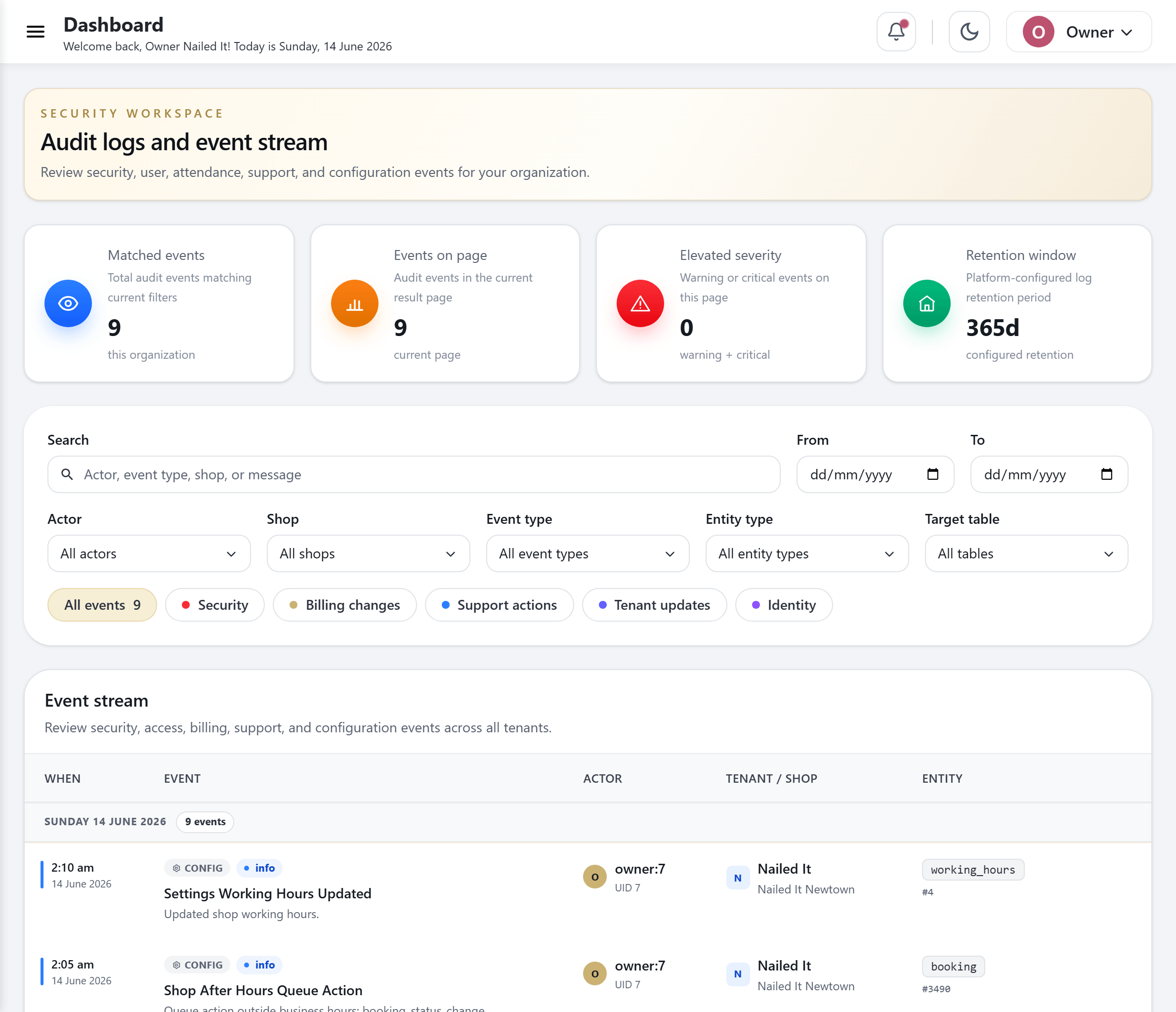
Front-desk software shouldn't hand everyone the keys
Salons and spas run on shared screens. The front desk, the kiosk by the door, the staff tablet in the back, they all touch the same system, and they are often used by people who come and go. Most booking tools give every login the same reach, so a new receptionist can see revenue, edit prices, or pull a client list on day one.
That is a quiet risk. A walked-off iPad, a shared password, or a curious hire can expose client phone numbers, takings, and staff records. And when something does go wrong, there is usually no record of who changed what, so you are left guessing.
WalkInCheckIn was built the other way around. Access is scoped by role, sensitive screens are gated, devices are trusted on purpose, and every meaningful action is written to a log you can read and export. You get a clear answer to who, what, and when, without policing it by hand.
How access control works in WalkInCheckIn
Layered protection, from the person logging in to the row in the database.
- 1
Assign a role
Every team member gets one of five roles. The role decides what they can see and do, so you set it once instead of locking individual buttons.
- 2
Gate each location's surfaces
Choose how the public surfaces at a location open: free to the room, PIN-gated, device-gated, or both. A shop near the street can be locked tighter than a quiet treatment room.
- 3
Pair trusted devices
Register the iPads and tablets you trust. An admin approves each one with a short enrollment code, so a random device can't quietly join your shop.
- 4
Verify identity for sensitive actions
Actions like clocking in are confirmed with a single-use, short-lived token tied to the staff member's PIN, so nobody clocks a coworker in or out.
- 5
Log everything
Audit records capture tracked actions, actors and timestamps. Authorised users can query and export records at their permitted business or shop scope.
- 6
Isolate the data
Businesses are isolated by database row-level security. Within a business, application permissions restrict access to assigned shops; authorised owners can work across their locations.
What is built in
Practical controls that match how a busy salon or spa actually operates.
Five roles, one clear hierarchy
Owner, Manager, Viewer (read-only), and Staff, plus a platform Superadmin for support. Privileges climb in a clear order, so a Viewer can look without touching and a Manager runs the floor without owner-only powers.
Per-location surface access modes
Set how each location's public surfaces open: open to the room, PIN-gated, device-gated, or PIN and device together. Tune the lock to the layout of each shop.
Trusted-device pairing
Register kiosks and tablets you trust, approve each with a short code, and rename or revoke any device later. If a device drifts, recovery brings it back without a full reset.
Verified staff identity
Sensitive actions use single-use, short-lived identity tokens backed by a staff PIN. Honest clock-in and clock-out, with no buddy-punching.
Audit trail
Audit records capture tracked actions, actors and timestamps. Authorised users can query and export records at their permitted business or shop scope.
Secure, revocable authentication
Password and PIN login with refresh tokens, full session revocation, and forgot, reset, and change-password flows. Login and sensitive endpoints are rate-limited to slow down abuse.
Encryption for sensitive data
Sensitive values, like your stored messaging-provider keys, are encrypted at rest, so the things that should stay private do.
Database-level location isolation
Businesses are isolated by database row-level security. Within a business, application permissions restrict access to assigned shops; authorised owners can work across their locations.
Who this protects
Owners who guard their client list
Your clients and your numbers are yours. Role limits and an export-ready audit trail mean a new hire, a temp, or a departing manager never has more reach than you grant.
Multi-location salons and spas
Run several nail salons, head spas, or day spas from one account while each location's data stays isolated. Give a location manager exactly their shop and nothing more.
Front desks on shared devices
Kiosks and staff tablets get used by many hands. Device pairing and surface gating keep the open surfaces honest, even on a screen sitting by the door.
Teams that need accountability
When you need to know who voided a sale or changed a price, the audit trail answers it plainly, so trust on the floor doesn't depend on memory.
Explore more
Pairs well with
Questions, answered
What roles does WalkInCheckIn support?
WalkInCheckIn has five roles in a clear privilege hierarchy: Owner, Manager, Viewer (read-only), and Staff, plus a platform Superadmin used for support. Each role sets what a person can see and do, so you assign access once instead of toggling individual screens.
Can I keep one location's data separate from another?
Businesses are isolated by database row-level security. Within a business, application permissions restrict access to assigned shops; authorised owners can work across their locations.
How does WalkInCheckIn stop staff from clocking each other in?
Clocking in uses a single-use, short-lived identity token backed by the staff member's PIN. Staff must keep PINs private; a PIN does not prove physical identity if it is shared.
Is there an audit trail, and can I export it?
Yes. WalkInCheckIn keeps an audit trail covering more than 60 event types. It is queryable at business, location, or platform scope, and you can export it to CSV or JSON for your own records or compliance needs.
How are the kiosks and tablets kept secure?
Each device is paired on purpose. An admin approves a new kiosk or tablet with a short enrollment code, and you can rename or revoke any device at any time. Per-location surface access modes let you keep public surfaces open, PIN-gated, device-gated, or both.
What protects login and account access?
WalkInCheckIn uses password and PIN login with refresh tokens, full session revocation, and forgot, reset, and change-password flows. Login and other sensitive endpoints are rate-limited. Stored provider credentials are encrypted, and passwords and PINs are hashed.
See WalkInCheckIn on your own salon’s flow
Book a 20-minute demo and we’ll show you the queue, kiosk and loyalty running on a setup like yours.