Loading
Bookings
Walk-in visits in one calm, live flow
WalkInCheckIn tracks checked-in walk-in visits through waiting, assignment, service and completion. The current product does not schedule future appointments or synchronise a booking calendar.
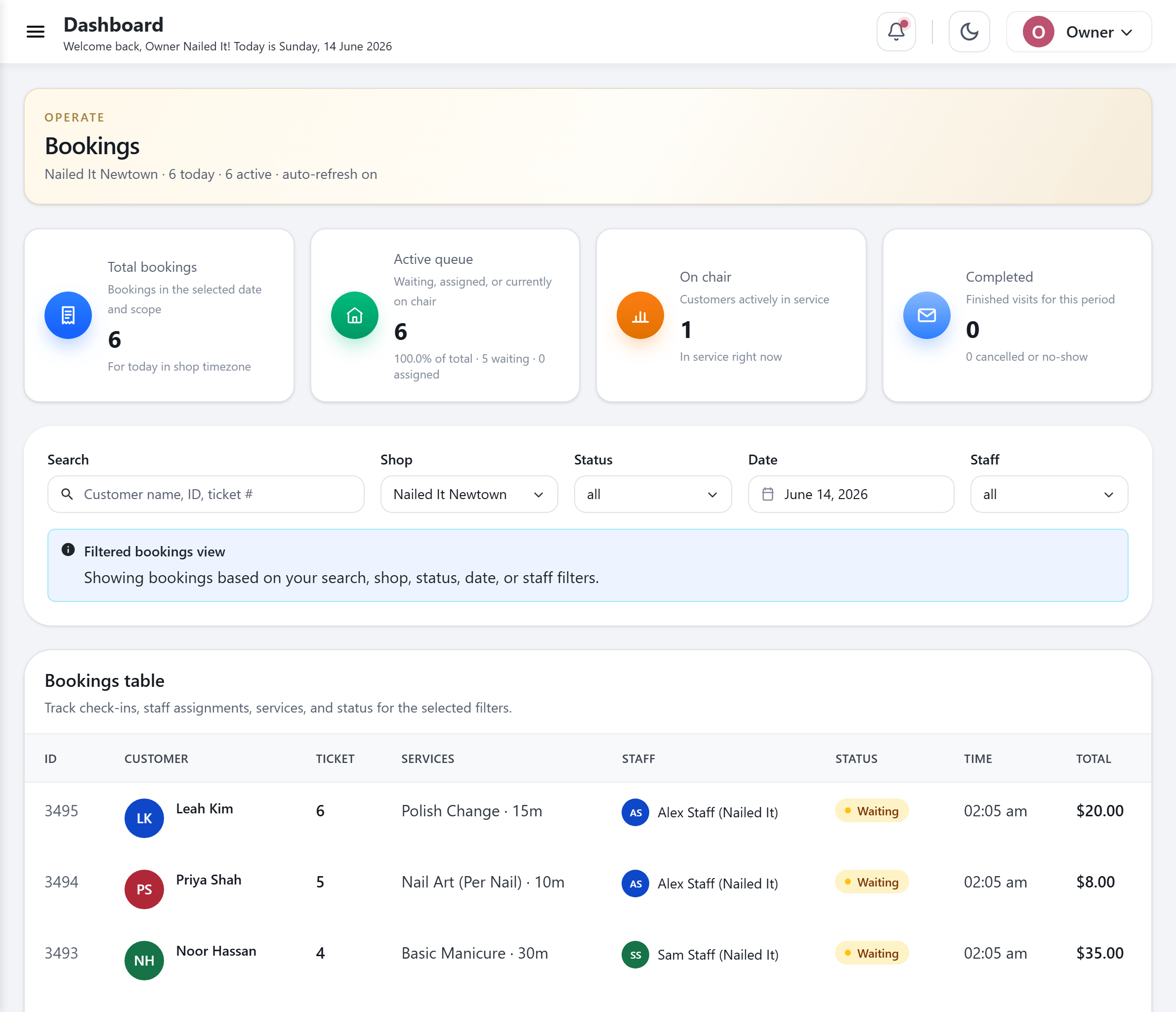
Most booking tools pretend walk-ins do not exist
Booking-first software was built around one assumption: a client already has an appointment. A walk-in is the absence of that appointment, so it gets bolted onto the side, scribbled on a clipboard, or lost between two screens that do not talk to each other.
For a busy nail salon or day spa, that split is where the day falls apart. The front desk juggles a paper waitlist for walk-ins and a separate calendar for bookings, double-books a tech, or loses track of who has been waiting longest. Clients feel the friction, and so does your team.
WalkInCheckIn gives walk-in arrivals a shared live board. Keep future appointments in your existing calendar; there is no automatic calendar integration or appointment-time reservation.
How bookings move through the day
Each checked-in walk-in visit follows a clear path from arrival to completion.
- 1
A client joins the board
A walk-in checks in at the kiosk or on their phone, or your front desk adds an arriving client by hand. The visit joins the live board with a daily ticket number.
- 2
Waiting, in order
New arrivals sit in the waiting state, ordered fairly so the front desk can see at a glance who has been waiting longest and who is up next.
- 3
Assigned to a staff member
You assign the next client to a specific staff member. Assignment is protected so two people cannot grab the same client at the same moment.
- 4
On the chair
When the service starts, the client moves to the on-chair state. The board shows who is working on whom, so anyone glancing at the screen sees the room in one look.
- 5
Completed
Marking a visit completed closes it out and automatically awards loyalty points for that visit. No separate step, no punch card.
- 6
Cancelled or no-show
If a client cancels or never arrives, you record it with a preset reason, so the board stays accurate and your reporting reflects what really happened.
What the bookings board covers
One queue for walk-in visits
Kiosk, phone and staff-created walk-in check-ins share one live board. Creating a visit does not reserve a future appointment time.
A six-stage lifecycle
Every booking moves through waiting, assigned, on-chair, and completed, with cancelled and no-show for the visits that do not finish. The status is always explicit.
Per-staff assignment
Assign each client to the right person, and see who is working on whom at a glance. Assignment is guarded so two staff cannot claim the same client at once.
A live view of the day
See current visit records, who is waiting and who is being served. Future appointment slots are managed outside WalkInCheckIn.
Real-time sync across devices
The board updates the instant anything changes. The waiting-room screen, the front desk, and a staff tablet all show the same truth at the same moment, with no refresh.
Cancellation handling with preset reasons
Record cancellations and no-shows against reasons you define once, so the team logs them consistently and the numbers stay clean.
Group check-ins
Add a family or a group of friends arriving together as one party, so a set of clients moves through the board without being split apart.
Loyalty on completion
Completing a visit awards loyalty points automatically, so your rewards program runs off the same board you already use to run the day.
Who it is for
Day spas welcoming walk-in guests
Spas can track walk-in arrivals and add-on services while retaining their existing appointment calendar and front-desk coordination.
High-volume nail salons
Walk-in-heavy salons keep an ordered line on a board the whole team can read at a glance.
Head spas and salons of every kind
Hair, beauty, lash and brow, waxing, blow-dry, and massage and wellness teams run a calm front of house where every visit has a clear, visible status.
Multi-location owners
Each location runs its own live board with its own data, and owners get one account across every shop, cleanly separated and rolled up where it matters.
Questions, answered
Does WalkInCheckIn handle both appointments and walk-ins?
WalkInCheckIn currently manages walk-in visits. It does not schedule future appointments, reserve time slots or synchronise external calendars. Keep your existing appointment calendar and coordinate arrivals at the front desk.
What are the stages of a booking in WalkInCheckIn?
Every booking moves through a six-stage lifecycle: waiting, assigned, on-chair, and completed, plus cancelled and no-show for visits that do not finish. The status is always explicit and visible on the board.
Can two staff members accidentally take the same client?
No. When you assign a client to a staff member, the assignment is protected against two people grabbing the same client at the same moment, so the board stays accurate during a rush.
Does the bookings board update in real time?
Yes. WalkInCheckIn is genuinely real-time. Any check-in, assignment, or completion updates every connected screen instantly, so the waiting-room display, the front desk, and a staff tablet always match without anyone hitting refresh.
How are cancellations and no-shows recorded?
You record a cancellation or no-show against a preset reason that you define once. That keeps logging consistent across the team and keeps your reporting honest about what actually happened.
Can I add a phone-in or a walk-in by hand?
Yes. Your front desk can create a booking manually for a phone-in or a walk-in, and it lands on the same board as everything else. You can also check in groups arriving together as one party.
See WalkInCheckIn on your own salon’s flow
Book a 20-minute demo and we’ll show you the queue, kiosk and loyalty running on a setup like yours.